


In this article
- Why White-Label Survey Platform Development Matters
- What Is a White-Label Survey Platform?
- Who Needs a White-Label Survey Platform?
- White-Label Survey Tool Versus Custom Survey SaaS Platform
- Core Features of a Survey Platform for Agencies
- MVP Feature Priority for White-Label Survey Platform Development
- Step-by-Step White-Label Survey Platform Development Roadmap
- Custom vs White-Label Panel Solutions
- Real-World Use Cases for a White-Label Survey Platform
- What Affects White-Label Survey Platform Development Cost?
- Data Privacy, Security, and Compliance Considerations
- Common Mistakes to Avoid
- Key Takeaways
- Final Thoughts
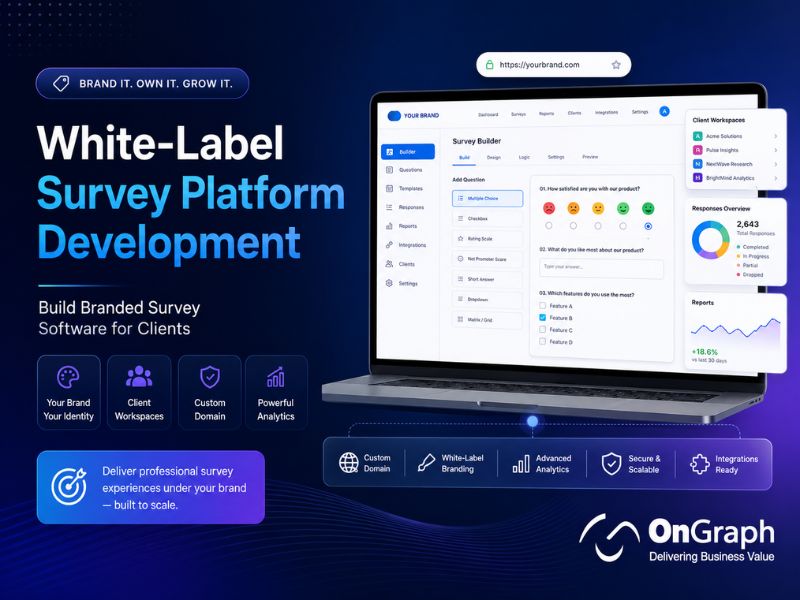
White-label survey platform development helps agencies and SaaS founders launch branded survey software for clients. It includes survey builders, client workspaces, custom domains, reporting, panels, quotas, user roles, and integrations.
- Build branded client portals.
- Add survey templates and logic.
- Connect panels and sample sources.
- Offer reports and exports.
- Manage roles and permissions.
- Monetize with subscriptions.
Why White-Label Survey Platform Development Matters
White-label survey platform development is useful when agencies want to offer branded survey software without sending clients to third-party tools. It helps agencies control the client experience, own workflows, and create recurring software revenue.
If your agency creates surveys for multiple clients using disconnected tools, branding becomes inconsistent and reporting becomes slow. A white-label survey platform helps you offer branded surveys, client portals, reports, panel workflows, and data controls from one system.
Many agencies already run surveys for clients. The challenge begins when every client needs a branded survey experience, separate access, custom reports, and secure data handling. Manual setup across multiple tools can reduce margins and delay delivery.
Research software is now a major part of the insights market. Research World reported that the global insights industry reached about $153 billion in 2024. It also reported that research software accounted for about $62 billion.
Survey software demand is also growing. Fortune Business Insights valued the online survey software market at $4.66 billion in 2025. Technavio also estimates that online survey software will grow by $6.44 billion from 2025 to 2029.
These numbers show why agencies are moving beyond basic survey tools. A branded survey platform can become a product, not only an internal delivery tool.
Build Your White-Label Survey Platform
What Is a White-Label Survey Platform?
A white-label survey platform is survey software that your company can brand as its own. Clients see your logo, colors, domain, emails, dashboards, and reports instead of a third-party product.
A platform may include:
- Survey builder
- Question library
- Survey logic
- Client workspaces
- Custom domains
- Branded emails
- Panel access
- Quota management
- Response dashboards
- Export tools
- Billing workflows
- User permissions
This is different from simply adding a logo to a survey. A real branded survey software product should support client-specific workflows, roles, data controls, reporting, and repeatable delivery.
For agencies, the biggest value is ownership. You can create a branded client experience while keeping workflows, reporting, and integrations aligned with your business model.
Who Needs a White-Label Survey Platform?
A white-label platform is useful for businesses that serve multiple clients or audience groups. It is especially helpful when surveys are a repeatable service.
Common users include:
- Market research agencies
- CX consulting firms
- Panel companies
- SaaS founders
- Employee engagement consultants
- Healthcare research firms
- Education assessment companies
- Enterprise insights teams
- White-label service providers
For agencies, the goal is simple. They want to deliver surveys under their own brand while reducing manual project work.
SaaS founders may have a different goal. They may want to launch a custom survey SaaS platform with subscription plans, team access, usage limits, and client dashboards.
Enterprise teams may need stronger control. They may want branded internal research portals, secure data flows, and better reporting across departments.
White-Label Survey Tool Versus Custom Survey SaaS Platform
A basic white-label survey tool may be enough for one team. A custom SaaS platform is better when you need client accounts, subscriptions, and long-term product ownership.
| Factor | White-Label Survey Tool | Custom Survey SaaS Platform |
| Launch speed | Faster | Slower |
| Branding control | Medium to high | Full control |
| Feature control | Platform-dependent | Fully customizable |
| Client workspaces | Limited or tier-based | Built around your model |
| Data ownership | Vendor-dependent | Configurable |
| Integrations | Predefined | Custom |
| Monetization | Limited | Subscription-ready |
| Best for | Quick branded surveys | Scalable survey product |
Custom development is useful when the survey platform itself becomes your business offering. It gives you more control over workflows, branding, pricing, integrations, and customer experience.
A custom platform also helps when your agency needs unique reporting, industry-specific templates, client approval flows, panel integrations, or billing models.
Planning to Launch Your Own Survey SaaS?
Core Features of a Survey Platform for Agencies
A strong survey platform for agencies should support internal teams and client users. The platform should reduce repeated setup while giving clients a professional branded experience.
1. Branded Client Workspaces
Each client should have a separate workspace. This keeps surveys, reports, users, themes, and data organized.
A workspace may include:
- Client logo
- Brand colors
- Custom theme
- User roles
- Survey library
- Response data
- Export settings
- Reporting permissions
Separate workspaces are important for data privacy. They also help agencies serve many clients from one platform without mixing access or reports.
2. Custom Domains and Branded URLs
Custom domains make the platform feel owned by your agency or client. Instead of generic survey links, respondents can access surveys through branded URLs.
A custom domain may look like:
- survey.youragency.com
- research.clientbrand.com
- feedback.clientname.com
Recognizable survey links can improve respondent trust. They also create a cleaner client experience than generic third-party URLs.
Custom domains are especially useful for client-facing research, employee feedback, customer experience surveys, and brand studies. They make the survey experience feel more professional and consistent.
3. Survey Builder With Logic
The survey builder is the core of the platform. It should help users create surveys without technical support.
Important capabilities include:
- Multiple question types
- Skip logic
- Branching
- Piping
- Randomization
- Matrix questions
- Media uploads
- Required answers
- Preview mode
- Mobile-friendly design
These features help teams create professional surveys faster. They also reduce dependence on developers for every study.
A good survey builder should be simple for non-technical users. It should also be flexible enough for advanced research workflows.
4. Templates for Faster Client Delivery
Templates help agencies repeat successful workflows. They also make the platform easier for non-technical users.
Useful template categories include:
- Customer satisfaction
- Brand awareness
- Product testing
- Employee feedback
- Concept testing
- Ad testing
- NPS
- Healthcare feedback
- Education research
- B2B research
Templates should be editable. Clients should customize questions, design, logic, and report views.
For agencies, templates can reduce setup time. They also help standardize quality across multiple client projects.
5. Panel and Sample Integration
A White-Label Market Research Platform should connect survey creation with respondent access. This is where Market Research Survey Panel Integration becomes important.
OnGraph’s market research survey panel tool supports respondent management, rewards, reporting, and integrations for survey panel workflows.
Panel integration can support:
- Sample targeting
- Quota checks
- Respondent invites
- Reward tracking
- Supplier links
- Survey redirects
- Completion status
- Quality checks
This is useful for agencies that run surveys across countries, segments, or audience groups. It turns a survey tool into a stronger research delivery platform.
MVP Feature Priority for White-Label Survey Platform Development
A focused MVP helps you launch faster and avoid unnecessary cost. It also helps validate client demand before expanding the product.
| MVP Feature | Why It Matters | Priority |
| Survey builder | Core platform function | Must-have |
| Client workspaces | Separates client data | Must-have |
| Branding controls | Enables white-label experience | Must-have |
| Reports and exports | Helps clients use data | Must-have |
| User roles | Protects access | Must-have |
| Custom domains | Builds respondent trust | High |
| Survey templates | Speeds client delivery | High |
| Panel integration | Supports research delivery | Phase 2 |
| Billing system | Enables SaaS monetization | Phase 2 |
| Advanced analytics | Improves insights | Phase 2/3 |
Do not build every feature at once. Start with the workflows your first clients need most.
A strong MVP should prove the platform can create surveys, manage clients, collect responses, and deliver useful reports.
Need a Branded Survey Platform for Clients?
Step-by-Step White-Label Survey Platform Development Roadmap
A clear roadmap helps avoid scope confusion. It also helps founders launch an MVP faster.
Step 1: Define Your Business Model
Start with your platform goal. Are you building internal agency software or a client-facing SaaS product?
Common models include:
- Agency-managed survey platform
- Self-service client portal
- Subscription-based SaaS
- White-label research software
- Panel-backed survey platform
- Industry-specific research tool
Your business model affects features, pricing, user roles, data rules, and integrations.
Step 2: Map User Roles
Most platforms need different user types. Each user should see only the right features and data.
Common roles include:
- Platform admin
- Agency manager
- Client admin
- Client user
- Researcher
- Analyst
- Respondent
- Finance user
- Support user
Role-based access protects client data. It also helps teams avoid accidental changes.
Step 3: Design the Survey Builder
The survey builder should be simple for users. It should still support professional research needs.
Start with essential features:
- Drag-and-drop editor
- Question library
- Skip logic
- Preview mode
- Mobile layout
- Survey status
- Version history
- Basic quality checks
Advanced features can come later. Add complex logic only after validating core user needs.
Step 4: Add Branding Controls
Branding should be easy to manage. Users should not need a developer for every design change.
Branding controls may include:
- Logo upload
- Font settings
- Color themes
- Button styling
- Background settings
- Email branding
- Report branding
- Custom domains
- Footer controls
A custom platform can support branding across surveys, emails, dashboards, reports, and client portals. This creates a consistent client and respondent experience.
Step 5: Build Client Dashboards
Clients need clear results without complex analytics tools. Dashboards should answer simple business questions.
Useful dashboard modules include:
- Total responses
- Completion rate
- Drop-off points
- Question-level charts
- Segment filters
- Date filters
- Country filters
- Export options
- Report sharing
- Downloadable PDFs
Dashboards should help clients move from responses to decisions. Raw data alone is not enough.
For better adoption, keep dashboards simple. Clients should quickly understand response trends, survey health, and key findings.
Step 6: Add Integrations
Integrations turn the platform into a real business tool. They also reduce manual work.
Common integrations include:
- Survey panels
- CRM systems
- Email tools
- Payment gateways
- Reward systems
- Analytics tools
- Data warehouses
- Webhooks
- Slack or Teams
- BI dashboards
A custom platform should solve workflow fragmentation for your clients. It should connect surveys with the tools they already use.
Step 7: Add Billing and Subscription Management
If you plan to sell the platform, billing matters. Your platform may need usage controls and plan limits.
Billing features may include:
- Subscription plans
- Seat limits
- Response limits
- Survey limits
- Client invoices
- Usage tracking
- Payment gateway
- Trial management
- Upgrade prompts
A SaaS survey product needs operational controls. Otherwise, revenue tracking becomes manual and difficult.
Billing should match your business model. For example, you may charge by client, survey volume, response count, seats, or custom usage.
Step 8: Test Security and Data Access
Security should be planned from the start. Surveys may collect personal, employee, customer, or health-related information.
Important controls include:
- Role-based access
- Audit logs
- Encryption
- Data exports
- Consent records
- Data deletion
- Secure hosting
- SSO
- Backup rules
- Admin approvals
Your platform should match the security needs of your target market. Compliance depends on setup, contracts, hosting, and legal review.
Need Help Defining Your Survey Platform MVP?
Custom vs White-Label Panel Solutions
Agencies often compare survey platforms with panel solutions. The right choice depends on whether you only need survey creation or also need respondent management.
| Need | Survey Platform | Panel Management Software | Combined White-Label Research Platform |
| Create surveys | Yes | Limited | Yes |
| Manage respondents | Limited | Yes | Yes |
| Run quotas | Yes | Yes | Yes |
| Track rewards | Usually no | Yes | Yes |
| Client branding | Yes | Sometimes | Yes |
| Panel integrations | Sometimes | Yes | Yes |
| Best for | Client surveys | Respondent management | Full research delivery |
If your agency needs respondents, surveys, rewards, and reports, a combined platform is stronger. This is where you can Launch White-Label Panel Management Software with survey workflows.
A combined product can become a complete White Label Market Research Solution. It can help agencies manage the full research lifecycle under their own brand.
For wider research workflows, you can also explore OnGraph’s market research DIY tool and panel management software.
Real-World Use Cases for a White-Label Survey Platform
A white-label survey platform can support many client-facing research services. These examples show how agencies can turn survey delivery into a repeatable product.
Client Feedback Programs
Agencies can create branded feedback portals for clients. Each client can run customer satisfaction surveys, NPS surveys, and service feedback studies.
The platform can provide reusable templates, branded emails, dashboards, and export tools. This reduces manual reporting work.
Ad and Concept Testing
Marketing agencies can offer branded ad-testing surveys. Clients can compare creative concepts, messages, packaging, or landing page ideas.
Survey templates can include audience screening, rating questions, open-ended feedback, and visual comparison sections. Reports can show which concept performs better.
Employee Engagement Surveys
HR consultants can launch white-label employee survey platforms. Clients can run pulse surveys, engagement studies, and workplace feedback programs.
The platform should include access controls, anonymous response options, and department-level reporting. Sensitive results should be handled carefully.
Healthcare and Patient Feedback
Healthcare research teams may need branded patient feedback surveys. These workflows require stronger privacy, consent, and security planning.
The platform should support controlled access, secure data handling, and region-specific compliance review. Do not assume healthcare compliance without expert validation.
Panel-Backed Research Products
Market research agencies can connect surveys with owned panels or sample partners. This helps clients launch studies and collect responses from targeted audiences.
Panel workflows may include quotas, rewards, respondent status, and quality checks. This creates a stronger end-to-end research product.
What Affects White-Label Survey Platform Development Cost?
Development cost depends on scope, features, integrations, compliance needs, and user experience depth. A simple branded survey tool costs less than a multi-client SaaS platform.
| Scope | Typical Features | Relative Investment |
| Basic MVP | Survey builder, themes, exports | Lower |
| Agency Platform | Client workspaces, reports, roles | Medium |
| Research Platform | Panels, quotas, rewards, dashboards | Higher |
| SaaS Product | Billing, subscriptions, APIs, admin tools | Highest |
Key cost factors include:
- Number of user roles
- Survey builder complexity
- Branding controls
- Custom domains
- Dashboard depth
- Panel integrations
- Payment integrations
- Data migration
- Reporting formats
- Security requirements
- Hosting model
- Admin workflows
The best approach is to start with an MVP. Add advanced features after real client usage.
For larger research businesses, the platform may also connect with a market research project management tool or supplier management software.
Want to Launch a White-Label Research Product?
Data Privacy, Security, and Compliance Considerations
A white-label survey platform may collect customer feedback, employee responses, health-related inputs, market research answers, and personal identifiers. The platform should include strong security and governance controls.
Important controls include:
- Consent capture
- Access permissions
- Secure login
- Data encryption
- Audit logs
- Data deletion
- Export controls
- Backup rules
- Regional hosting
- Vendor agreements
If the platform serves clients in different regions, data handling rules may vary. GDPR, CCPA, DPDP, HIPAA, SOC 2, and ISO readiness depends on hosting, contracts, workflows, vendor controls, and legal review.
Do not market the platform as compliant by default. Instead, build the right technical controls and validate compliance with qualified legal and security experts.
Privacy should be part of product planning. It should not be added only after launch.
Common Mistakes to Avoid
Building Only a Survey Form Builder
Clients need more than forms. They need branding, reporting, permissions, panels, exports, and support workflows.
Ignoring Multi-Tenant Architecture
A client-facing platform needs separate workspaces. Without this, data separation becomes risky.
Adding Too Many Features Early
A bloated MVP delays launch. Start with surveys, branding, workspaces, reports, and exports.
Forgetting Panel Integration
Agencies need respondents, not only survey links. Panel integration can make the platform more valuable.
Weak Reporting Experience
Clients want insights, not only CSV files. Build simple dashboards and shareable reports.
Missing Billing Controls
A SaaS platform needs plans, usage limits, invoices, and admin controls. Manual billing can slow growth.
Overlooking Data Governance
Survey responses can include sensitive data. Add access control, consent, deletion, and audit workflows early.
Build Branded Survey Software for Your Clients
Key Takeaways
- White-label survey platform development helps agencies launch branded survey products.
- A real platform needs more than logo and color changes.
- Client workspaces support privacy and account management.
- Survey logic, templates, and reporting improve delivery speed.
- Panel integrations help agencies reach targeted respondents.
- SaaS products need billing, roles, usage limits, and admin tools.
- Custom development gives more control than generic survey tools.
- Privacy and compliance should be planned early.
- OnGraph can help build white-label survey and panel platforms.
Final Thoughts
White-label survey platform development is a strong opportunity for agencies and SaaS founders. It helps turn survey delivery into a branded, scalable, and repeatable product.
Start with the client experience. Then define survey creation, branding, workspaces, reporting, panels, integrations, and billing.
A simple survey builder is not enough for long-term growth. Your platform should support client trust, data control, monetization, and better research delivery.
If you want to build a White-Label Market Research Platform, OnGraph can help plan the MVP, architecture, integrations, and product roadmap.
FAQs
White-label survey platform development is the process of building branded survey software that agencies or SaaS companies can offer to clients.
It may include survey creation, client portals, custom domains, reporting, panels, integrations, and billing.
Normal survey software usually shows the vendor’s platform experience. Branded survey software lets your company control the user experience.
It may include your logo, domain, colors, emails, reports, and client dashboard.
Important features include a survey builder, branding controls, custom domains, templates, client workspaces, reports, roles, exports, and integrations.
Market research platforms may also need panels, quotas, rewards, supplier links, and quality checks.
Yes. Agencies can build a custom survey SaaS platform for client self-service, managed research, or recurring subscriptions.
The platform should include multi-tenant access, usage limits, billing, dashboards, and admin controls.
Panel integrations help agencies reach targeted respondents. They can support sample targeting, quotas, rewards, supplier links, redirects, and completion tracking.
This turns a survey tool into a stronger market research platform.
Use a white-label tool when you need a faster branded setup. Build custom software when workflows, integrations, branding, or monetization need more control.
The right choice depends on budget, launch timeline, and product strategy.
Cost depends on survey builder complexity, client workspaces, branding, reports, integrations, security, billing, and admin features.
Start with an MVP to validate demand before building advanced features.
Yes. A custom platform can support plans, user limits, response limits, invoices, trials, and usage tracking.
These features are important if you want to launch a survey SaaS product.
Yes. OnGraph can build survey platforms with respondent management, panels, rewards, reporting, supplier integrations, and custom workflows.
Explore OnGraph’s market research survey panel tool to discuss your platform needs.
About the Author

Let’s Create Something Great Together!
Latest Blog


Let’s have a conversation today!


India
ONGRAPH TECHNOLOGIES PRIVATE LIMITED,
SDF L-1, NSEZ,
Sector 81, Block L, Phase-2,
Noida, Uttar Pradesh-201305

USA
OnGraph Technologies,
120 Bethpage Rd, Suite 304,
Hicksville, NY 11801, USA

Canada
7-1039 CEDARGLEN GATE,
Mississauga, Ontario,
Canada L5C 3A7

UK
89 Banstead Road South,
Sutton, Surrey, SM2 5LH
United Kingdom

Malaysia
G-3A, Amaya Maluri, Jalan
Jejaka 2, Taman Maluri,
KL–55100, Malaysia

Singapore
10 Anson Road,#26-04
International Plaza,
Singapore (079903)