

In this article
- Why UrbanClap Clone App Cost Matters
- Brand and Trademark Note
- What Is an UrbanClap Clone App?
- How Much Does an UrbanClap Clone App Cost?
- Main Factors That Affect UrbanClap Clone App Development Cost
- UrbanClap Clone App Features You Need
- Urban Company Clone App Development: Build vs White-Label
- On-Demand Home Services App Development Cost by Complexity
- Suggested Timeline to Build UrbanClap Clone App
- Monetization Models for Home Services Marketplace Apps
- Mini Case Study 1: Urban Company’s Scale and Market Position
- Mini Case Study 2: Instant Home Services and Pronto’s Growth
- Real-World Examples to Study
- Step-by-Step Framework to Build UrbanClap Clone App
- How to Choose an On-Demand Service App Development Company
- Build Your UrbanClap Clone App With OnGraph
- Key Takeaways
- Final Thoughts
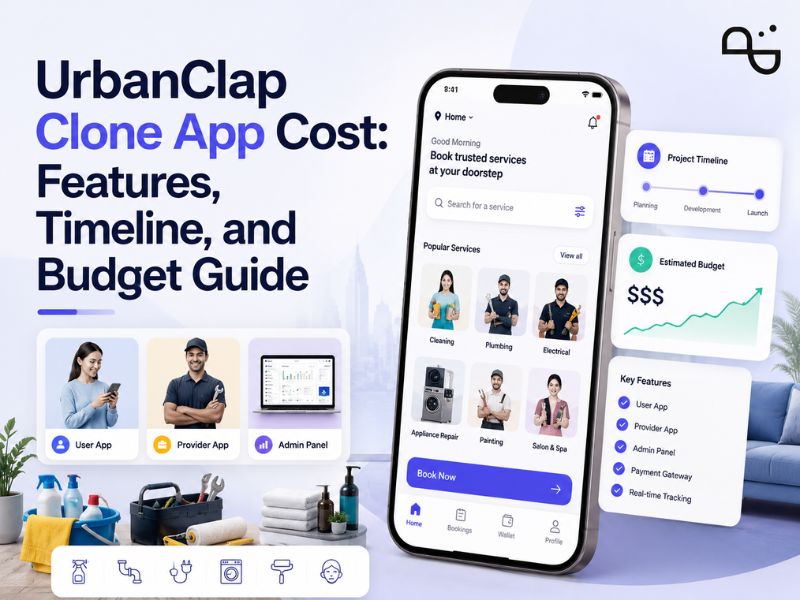
UrbanClap Clone App Cost depends on features, platforms, app complexity, design, integrations, and launch model.
- MVP apps cost less.
- Full marketplaces cost more.
- Customer, provider, and admin apps are required.
- Booking, payments, tracking, and reviews affect cost.
- White-label apps launch faster.
- Custom apps offer more control.
Why UrbanClap Clone App Cost Matters
UrbanClap Clone App Cost is one of the first questions founders ask before entering the home services market.
The answer depends on your business model.
A basic home services app may only include booking, provider profiles, payments, and admin controls.
A full marketplace needs customer apps, provider apps, admin panels, commissions, subscriptions, live tracking, ratings, analytics, and support workflows.
Urban Company’s growth shows the opportunity in this space.
Urban Company reported INR 827 crore revenue in FY24 with 30% growth.
For startups, the key question is not only “how much does it cost?”
The better question is: “What should we build first to launch faster and validate demand?”
Get an UrbanClap Clone App Cost Estimate
Brand and Trademark Note
In this guide, “UrbanClap clone app” refers to an Urban Company-style on-demand home services marketplace with similar booking, provider, customer, and admin workflows.
It does not mean copying Urban Company’s brand, logo, design, content, or proprietary features.
Your app should be built with original branding, custom workflows, and a unique user experience.
This note is important because “clone” is commonly used as a search term. In real product development, the goal should be to build a legally safe and differentiated marketplace.
What Is an UrbanClap Clone App?
An UrbanClap clone app is an on-demand home services marketplace.
It helps customers book trusted service professionals for home, beauty, cleaning, repair, wellness, and local services.
Urban Company currently lists categories like salon, cleaning, pest control, appliance repair, plumbing, carpentry, painting, and smart products.
A clone app does not mean copying the original platform.
It means building a similar marketplace model with your own brand, categories, pricing rules, service workflows, and customer experience.
A strong home services marketplace usually includes:
- Customer app
- Service provider app
- Admin dashboard
- Booking engine
- Payment system
- Service categories
- Ratings and reviews
- Notifications
- Commission management
- Support tools
If you want to build this type of platform, you need to plan both the app and the operations behind it.
How Much Does an UrbanClap Clone App Cost?
The UrbanClap Clone App Cost can vary widely.
Public competitor estimates show different pricing ranges.
OnGraph estimated the cost to develop a home service app like Urban Company to be between USD 40,000 and USD 300,000 or more.
These are planning estimates, not fixed prices.
Your final cost depends on features, platforms, design complexity, development team, region, integrations, and support needs.
| App Type | Best For | Cost Direction |
| Basic MVP | Early-stage startup | Lower |
| Mid-level app | Growing service brand | Medium |
| Full marketplace | Multi-category platform | Higher |
| Enterprise platform | Multi-city operations | Highest |
| White-label app | Faster launch | More predictable |
| Custom app | Unique workflows | Flexible but deeper planning |
The final UrbanClap clone app development cost depends on the app scope, platforms, features, design complexity, integrations, team location, launch model, and post-launch support.
Always request a project-specific estimate before making a build decision.
Main Factors That Affect UrbanClap Clone App Development Cost
The cost changes when the app becomes more complex.
A simple booking app is easier to build.
A full home services marketplace needs deeper planning, multiple apps, admin controls, provider workflows, and payment logic.
1. Number of Apps and Panels
Most UrbanClap-like platforms need three core systems.
These include:
- Customer app
- Service provider app
- Admin panel
You may also need:
- Website
- Dispatcher panel
- Finance panel
- Support panel
- Vendor management panel
- Analytics dashboard
More panels mean more design, development, and testing.
A startup can begin with customer app, provider app, and admin panel first.
Advanced panels can be added after launch.
2. Service Categories
A single-category app costs less.
For example, a cleaning services app is simpler than a multi-category marketplace.
A large app may include:
- Beauty services
- Cleaning services
- Electricians
- Plumbers
- Appliance repair
- Pest control
- Painting
- Home inspection
- Fitness trainers
- Wellness services
Each category may need different pricing, booking, provider skills, and service duration.
This is why category planning affects development cost.
Start with fewer categories if you want to control your MVP budget.
3. Booking Workflow
Booking is the heart of the app.
A basic booking system includes service selection, date, time, address, and payment.
Advanced booking may include:
- Instant booking
- Scheduled booking
- Recurring booking
- Multi-service booking
- Provider auto-assignment
- Rescheduling
- Cancellation rules
- Dynamic pricing
- Service add-ons
- Package booking
More booking logic increases cost.
A clear booking flow also improves customer conversion.
4. Provider Management
Provider workflows are critical for marketplace quality.
The provider app should support:
- Profile creation
- Document upload
- Availability management
- Job acceptance
- Navigation
- Earnings dashboard
- Service history
- Ratings and reviews
- Payout status
Provider verification also adds cost.
A trusted marketplace needs strong onboarding and approval workflows.
Urban Company had about 47,800 monthly active service professionals in FY25.
5. Payments, Payouts, and Commissions
Payment features affect both cost and operations.
Your app may need:
- Online payments
- Cash payment tracking
- Wallets
- Refunds
- Tips
- Promo codes
- Commission deduction
- Provider payouts
- Subscription plans
- Invoice generation
Commission logic should be clear from the start.
Changing payment workflows later can increase development effort.
A good app should also help admins track revenue, pending payouts, refunds, and provider earnings.
6. Live Tracking and Notifications
Customers expect visibility after booking.
Live tracking can show provider location, ETA, job status, and completion updates.
Notifications may include:
- Booking confirmation
- Provider assigned
- Provider on the way
- Job started
- Job completed
- Payment received
- Review request
SMS, email, WhatsApp, and push notifications may all add cost.
These features improve customer experience, but they need third-party integrations.
Also read- 25 Home Services Marketplace Features to Build a Scalable Platform
UrbanClap Clone App Features You Need
A strong app must serve customers, providers, and admins.
Each role needs different features.
The best way to control cost is to divide features into MVP and advanced modules.
Customer App Features
The customer app should make service booking simple.
Key features include:
- User signup
- Service category search
- Provider profiles
- Price estimates
- Date and time selection
- Address management
- Online payments
- Booking history
- Ratings and reviews
- Support chat
- Offers and coupons
- Notifications
A clean customer app improves conversion.
Too many steps can reduce bookings.
The goal should be simple browsing, fast booking, and clear pricing.
Service Provider App Features
The provider app helps professionals manage work.
Important features include:
- Provider registration
- Document verification
- Service selection
- Availability calendar
- Job requests
- Route navigation
- Earnings dashboard
- Job history
- Customer communication
- Payout tracking
- Review management
A good provider app improves supply quality.
This matters because service marketplaces need reliable professionals.
If providers find the app difficult, service fulfillment can suffer.
Admin Panel Features
The admin panel controls the full marketplace.
It should include:
- User management
- Provider management
- Service category management
- Booking management
- Pricing control
- Commission settings
- Coupon management
- Payment tracking
- Refund management
- Reports and analytics
- Dispute management
- Content management
- Role-based access
A weak admin panel creates operational problems.
A strong admin panel helps teams scale faster.
For enterprises, admin roles and permission controls become very important.
Urban Company Clone App Development: Build vs White-Label
Before choosing Urban Company clone app development, decide on your build model.
You can build custom software or launch with a white-label solution.
| Option | Best For | Advantage | Limitation |
| Custom development | Unique marketplace ideas | Full control | Higher planning effort |
| White-label app | Fast launch | Faster deployment | Limited flexibility |
| MVP build | Testing demand | Lower initial cost | Fewer features |
| Enterprise build | Multi-city scale | Stronger architecture | Higher budget |
Choose a white-label model if speed matters most.
Pick custom development when your workflows, pricing, branding, or categories are unique.
A white-label app can help you launch faster.
Custom development gives stronger control over business logic and long-term scalability.
Get Your UrbanClap Clone App Cost Estimate
On-Demand Home Services App Development Cost by Complexity
The on-demand home services app development cost changes depending on complexity.
A startup may start with one city and a few categories.
An enterprise may need multi-city service management, provider ranking, dispatch tools, and advanced analytics.
| Complexity Level | Example Scope | Timeline Direction |
| MVP | Booking, payments, basic admin | Medium |
| Advanced | Live tracking, wallets, payouts, analytics | Longer |
| Enterprise | Multi-city, subscriptions, automation, roles | Longest |
A phased launch helps reduce risk.
Start with core booking. Then add advanced marketplace features after real demand is validated.
Suggested Timeline to Build UrbanClap Clone App
Timeline depends on app scope.
A basic MVP can launch faster than a full marketplace.
| Stage | What Happens |
| Week 1–2 | Discovery, feature planning, user flows |
| Week 3–5 | UI/UX design for apps and admin |
| Week 6–12 | Customer app and provider app development |
| Week 8–14 | Backend and admin panel development |
| Week 12–16 | QA, bug fixing, and launch preparation |
| Post-launch | Monitoring, updates, and feature expansion |
A white-label app may launch faster.
Custom apps need more discovery, testing, and stabilization.
The exact timeline depends on the number of features, platforms, and integrations.
Monetization Models for Home Services Marketplace Apps
Your revenue model affects features and cost.
Common monetization models include:
- Commission per booking
- Provider subscription
- Featured listings
- Lead fees
- Convenience charges
- Surge pricing
- Membership plans
- Ads and promotions
- Cancellation fees
- Product sales
Urban Company’s model includes home services and product categories.
Its website lists Native Smart Products like water purifiers and smart locks.
You can start with one revenue model.
After launch, add more monetization features as demand grows.
Mini Case Study 1: Urban Company’s Scale and Market Position
Urban Company is one of the strongest examples in this space.
Reuters reported that Urban Company reached a nearly USD 3 billion valuation during its 2025 market debut.
It also reported strong investor interest due to the largely unorganized home services market.
This case shows the scale potential of organized home services.
Still, building a similar marketplace needs more than an app.
You need provider supply, category operations, customer trust, support, quality control, and pricing discipline.
Note: This example shows how on-demand home services businesses can scale. It is not a direct cost benchmark for building an UrbanClap clone app.
Mini Case Study 2: Instant Home Services and Pronto’s Growth
Reuters reported that Pronto raised USD 20 million in a Series B round in 2026.
The same report said Pronto grew from 3,000 daily bookings in December to over 26,000 daily bookings.
Pronto offers quick home services like laundry, kitchen prep, and cleaning.
This case shows a growing trend.
Customers increasingly expect faster services and shorter booking windows.
Founders should consider instant booking, provider density, and supply planning early.
Note: This example is a market reference, not a direct development cost estimate.
Actual cost depends on features, geography, operations, and launch model.
Real-World Examples to Study
Before building, study different marketplace models.
| Platform | What to Learn |
| Urban Company | Multi-category home services marketplace |
| TaskRabbit | Task-based local services |
| Thumbtack | Lead-based professional marketplace |
| Angi | Homeowner and contractor matching |
| Handy | Cleaning and home services booking |
| Pronto | Instant home services model |
Each platform solves a different problem.
Your app should not copy all of them.
Pick the model that matches your market and supply.
Step-by-Step Framework to Build UrbanClap Clone App
Step 1: Choose Your Service Categories
Start with 3 to 5 categories.
Avoid launching too many categories before proving demand.
A focused category strategy helps reduce costs and improve operations.
Step 2: Define Your Marketplace Model
Decide whether providers are freelancers, agencies, employees, or verified partners.
This affects onboarding, payouts, pricing, and quality control.
Your marketplace model should match local supply availability.
Step 3: Plan Core Apps
Build the customer app, the provider app, and the admin panel first.
These are the core systems.
Extra dashboards can be added later.
Step 4: Add Booking and Payment Workflows
Plan booking rules, cancellation policy, pricing, and payment flow.
These decisions affect user trust.
They also affect development cost and testing time.
Step 5: Build Quality Control
Add reviews, provider verification, service standards, and complaint management.
Quality control protects brand reputation.
It also helps improve repeat bookings.
Step 6: Launch in One Region
Start with one city or zone.
This helps you test supply and demand.
After stable operations, expand to more locations.
Step 7: Track Metrics and Scale
Monitor bookings, repeat users, provider earnings, cancellations, and support issues.
Scale only when operations are stable.
A marketplace should grow with data, not assumptions.
How to Choose an On-Demand Service App Development Company
Choosing the right on-demand service app development company reduces project risk.
Look for a team that understands marketplace workflows.
Ask these questions:
- Have they built on-demand apps before?
- Can they build customer and provider apps?
- Do they offer admin panel customization?
- Can they support payments and payouts?
- Do they understand booking logic?
- Can they support white-label and custom builds?
- Do they provide post-launch support?
- Can they explain cost clearly?
A low quote may look attractive.
Poor planning can cost more after launch.
Choose a team that can guide you on features, timeline, scalability, and business workflows.
Build Your UrbanClap Clone App With OnGraph
OnGraph helps businesses build on-demand service marketplace apps like UrbanClap.
Our UrbanClap Clone App solution can support customer apps, provider apps, admin dashboards, bookings, payments, live tracking, and service management.
OnGraph can help with:
- UrbanClap clone app development
- Home services marketplace app development
- Customer app development
- Provider app development
- Admin panel development
- Booking workflows
- Payment integration
- Commission management
- White-label app customization
- Post-launch support
Build Your Home Services App With Experts
Launch a scalable customer, provider, and admin platform with booking, payments, tracking, and service management.
Key Takeaways
UrbanClap Clone App Cost depends on features, platforms, integrations, and launch model.
A basic MVP costs less than a full marketplace.
Customer app, provider app, and admin panel are essential.
Booking, payments, tracking, and payouts affect cost.
White-label apps launch faster.
Custom apps offer stronger control and flexibility.
Final Thoughts
The UrbanClap Clone App Cost is not just a development number.
It is a business planning decision.
You need to consider features, service categories, provider supply, payments, operations, and support.
A simple MVP can help you test demand quickly.
A full marketplace needs stronger architecture and operational planning.
The best approach is phased.
Start with core services, one launch region, and essential workflows.
After real bookings start, improve provider management, automation, analytics, and monetization.
A successful home services marketplace is not only an app.
It is a complete system for customers, providers, operations, payments, and trust.
FAQs
The UrbanClap Clone App Cost depends on features, platforms, integrations, and complexity.
A simple MVP costs less.
A full marketplace with a customer app, a provider app, an admin panel, payments, live tracking, and advanced analytics costs more.
The final cost also depends on design, technology stack, development region, third-party APIs, and post-launch support.
Main cost factors include app modules, service categories, booking workflows, payments, provider management, live tracking, admin features, design, and post-launch support.
A single-category app is usually cheaper.
A multi-category marketplace with commissions, provider payouts, subscriptions, coupons, and analytics incurs higher costs.
A basic MVP can take a few months.
A full marketplace with customer, provider, and admin apps may take longer.
The timeline depends on features, platforms, UI/UX complexity, integrations, testing, and launch model.
White-label apps can launch faster than fully custom builds.
Must-have features include customer signup, service search, booking, payments, provider app, admin dashboard, ratings, reviews, notifications, and reports.
Advanced features may include live tracking, wallets, provider payouts, subscriptions, coupons, role-based admin access, and analytics.
Start with core features first.
Then add advanced features after launch.
White-label is better for faster launch and predictable setup.
Custom development is better when you need unique workflows, custom branding, special pricing rules, or advanced marketplace logic.
The right choice depends on your timeline, budget, and long-term business plan.
About the Author

Let’s Create Something Great Together!
Latest Blog
Let’s have a conversation today!


India
ONGRAPH TECHNOLOGIES PRIVATE LIMITED,
SDF L-1, NSEZ,
Sector 81, Block L, Phase-2,
Noida, Uttar Pradesh-201305

USA
OnGraph Technologies,
120 Bethpage Rd, Suite 304,
Hicksville, NY 11801, USA

Canada
7-1039 CEDARGLEN GATE,
Mississauga, Ontario,
Canada L5C 3A7

UK
89 Banstead Road South,
Sutton, Surrey, SM2 5LH
United Kingdom

Malaysia
G-3A, Amaya Maluri, Jalan
Jejaka 2, Taman Maluri,
KL–55100, Malaysia

Singapore
10 Anson Road,#26-04
International Plaza,
Singapore (079903)